What Are Match Definitions
A match definition is the core building block of the matching process in MatchLogic. It is a named set of criteria that tells the system exactly how to compare two records and determine whether they refer to the same entity.
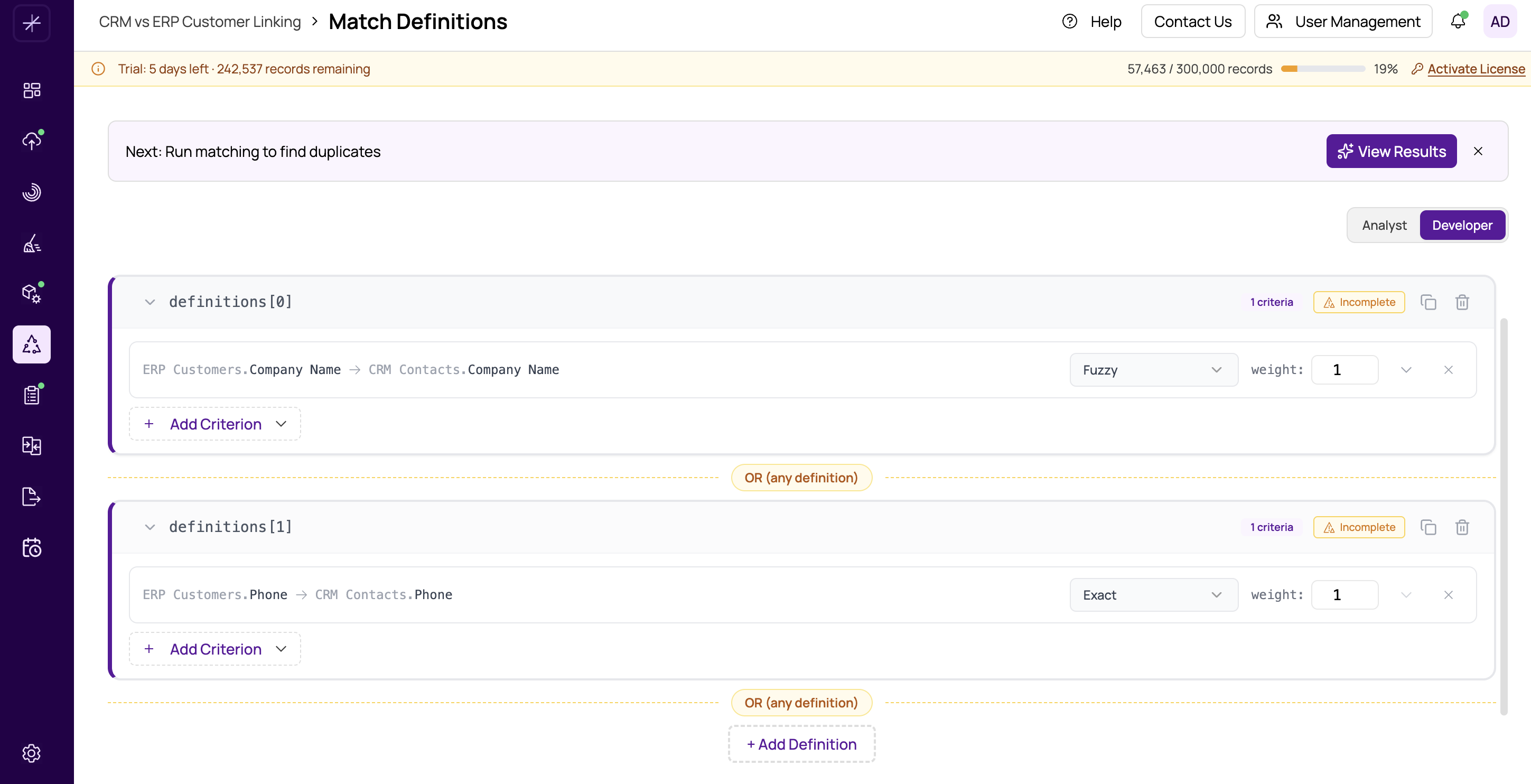
Anatomy of a Match Definition
Each match definition contains one or more field-level criteria. A criterion specifies:
- Field pair — which fields to compare (for example,
FirstNamein Source A againstFirst_Namein Source B) - Match type — how to compare the values (Exact Match, Similar Text, Sounds Alike, or Numeric Range)
- Weight — how much influence this criterion has on the overall match score
When MatchLogic evaluates a pair of records against a definition, it scores each criterion individually and then calculates a weighted composite score. If the composite score meets the threshold, the pair is considered a match under that definition.
Multiple Definitions and OR Logic
You can create multiple match definitions within a single project. Definitions are combined using OR logic: if a pair of records satisfies any definition, they are considered duplicates. The records do not need to match on every definition — just one is enough.
This is a powerful capability. It allows you to set up different matching strategies that work in parallel:
- Definition 1: Match on Name + Address (catches duplicates where contact information overlaps)
- Definition 2: Match on Email + Phone (catches duplicates even if names are different)
- Definition 3: Match on Customer ID (catches exact system-level duplicates)
A record pair that matches on email and phone but not on name and address would still be flagged as a duplicate, because Definition 2 was satisfied.
When to Use Multiple Definitions
Use multiple definitions when:
- Your data has several possible indicators of duplication
- You want to catch matches that a single definition might miss
- Different record types in your data require different comparison logic
Tip
Start with a single definition covering your strongest match criteria. Run a match and review the results. Then add more definitions to catch additional duplicates that the first one missed. See creating-multiple-definitions for details.
Before You Begin
Before creating definitions, make sure you have:
- Configured your datasource pairs in https://help.matchlogic.io/article/394-configuring-datasource-pairs
- Set up field mappings between your datasources in field-mapping-between-datasources
Field mappings determine which fields are available as criteria in your definitions. Without mappings, you will not have fields to compare.