(Advanced) Database Export Settings Reference
When exporting to a database destination (SQL Server, MySQL, or PostgreSQL), the Final Export settings panel exposes advanced configuration options that control how data is written. This article is a complete reference for each setting.
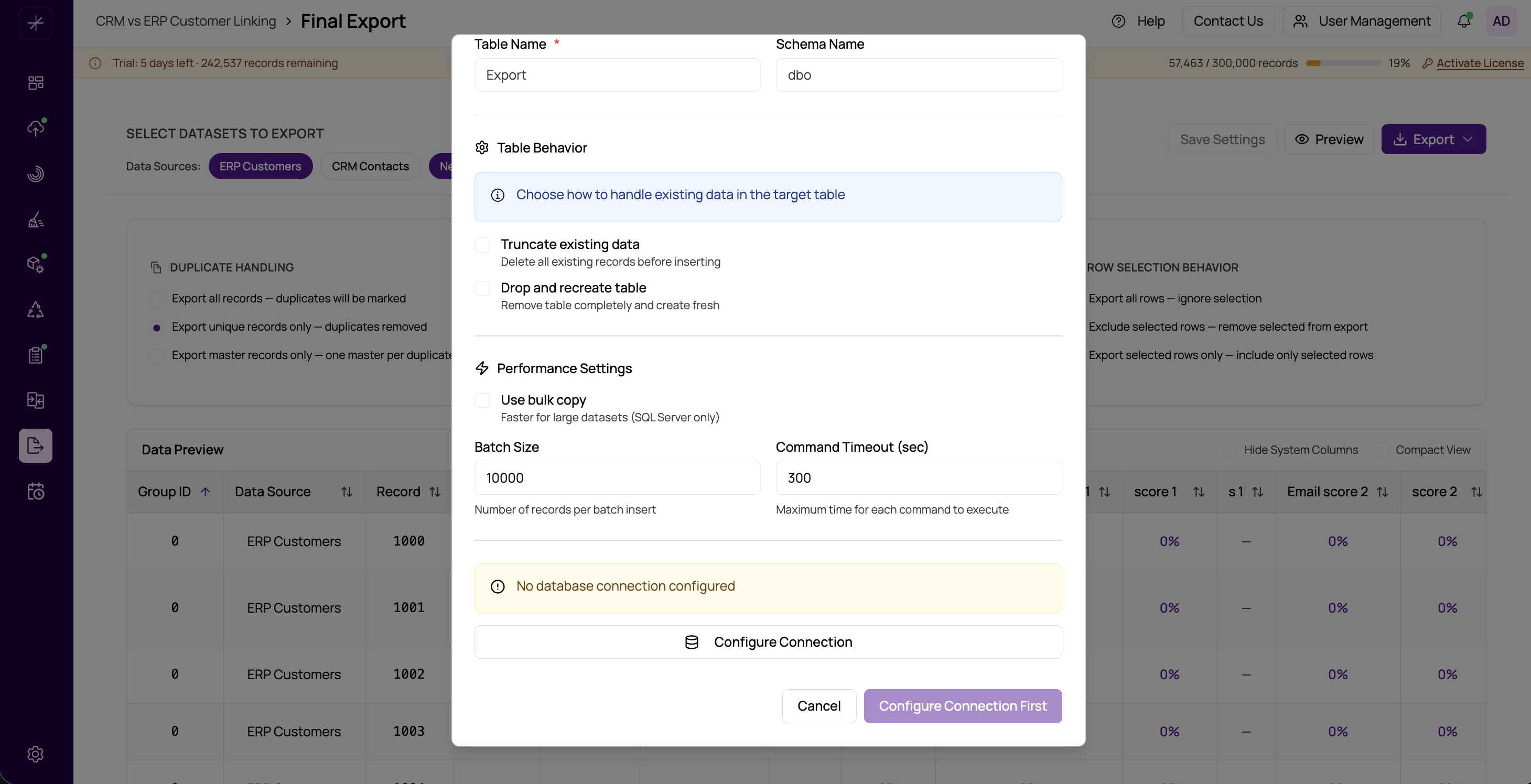
For basic database export setup, see Export to Database. The settings below appear after you select a database connection and target table.
Schema Name
The database schema that contains (or will contain) the target table. For SQL Server, this is typically dbo . For PostgreSQL, it is often public . MySQL does not use schemas in the same way — this field maps to the database name for MySQL exports.
If the schema does not exist, the export job will fail. Ensure the schema exists and the connecting user has write permissions to it.
Table Name
The name of the table to write exported records into. If the table does not exist and you are not using Drop and Recreate, MatchLogic will attempt to create it automatically with columns matching the export output. If the table already exists, the export appends or truncates depending on the Truncate Before Export setting.
Command Timeout
The maximum number of seconds the export engine waits for a single database command (INSERT batch, table creation, etc.) to complete before treating it as a failure. The default is 30 seconds.
Increase this value if you are exporting large batches to a slow or heavily loaded database server and seeing timeout errors. For very large exports (millions of records), values of 120–300 seconds are common.
Batch Size
The number of records inserted per database transaction batch. The default is 1,000 records per batch. Tuning this value affects both performance and memory usage:
- Larger batch size (e.g., 5,000–10,000) — fewer round trips to the database, faster overall throughput. Requires more memory and a higher Command Timeout.
- Smaller batch size (e.g., 100–500) — more database round trips, slower overall, but lower peak memory usage and less risk of timeout on slow connections.
Tip
Start with the default batch size of 1,000. If the export is slow, try increasing to 5,000. If you see timeout or memory errors, reduce the batch size and increase the Command Timeout.
Truncate Before Export
When enabled, MatchLogic issues a TRUNCATE TABLE command against the target table before writing any records. This clears all existing rows, ensuring the table contains only the records from the current export run.
Use this option when you want a clean, full-replacement export each time — for example, maintaining a denormalized reporting table that is refreshed on each pipeline run.
Truncate preserves the table structure (columns, indexes, constraints). Only row data is deleted.
Drop and Recreate
When enabled, MatchLogic drops the target table entirely and recreates it before writing records. The new table schema is derived from the export output columns.
Destructive Operation
Drop and Recreate is irreversible. The existing table, all its rows, all indexes, all constraints, and any views or foreign keys referencing it are permanently deleted. Only use this option when you are certain the table can be recreated and downstream dependencies have been accounted for.
Drop and Recreate is useful when:
- The export column set has changed (new fields added, removed, or renamed) and you need the table schema to match the new structure.
- You want to eliminate legacy indexes or constraints and let the table be created fresh.
- You are working in a staging or development environment where the table has no persistent downstream dependencies.
Truncate vs Drop and Recreate
| Setting | Preserves Schema | Preserves Indexes | Clears Rows |
|---|---|---|---|
| Truncate Before Export | Yes | Yes | Yes |
| Drop and Recreate | No (rebuilt) | No (rebuilt) | Yes (table dropped) |
For production tables with manually managed indexes and constraints, always prefer Truncate. Reserve Drop and Recreate for managed or disposable export targets.